Sensor Types
HydroNode has built-in names, units and icons for the types below. Your device names the type of every value with its key, for example TEMPERATURE. Always send the exact uppercase key.
TEMPERATUR therefore creates a new measurement instead of an error, so glance at the sensor page after the first upload.| Type ID | Display Name | Unit |
|---|---|---|
| TEMPERATURE | Temperature | °C |
| TEMPERATURE2 | Temperature 2 | °C |
| TEMPERATURE3 | Temperature 3 | °C |
| HUMIDITY | Humidity | % |
| HUMIDITY2 | Humidity 2 | % |
| HUMIDITY3 | Humidity 3 | % |
| PRESSURE | Air Pressure | hPa |
| DEW_POINT | Dew Point | °C |
| HEAT_INDEX | Heat Index | °C |
| ABS_HUMIDITY | Absolute Humidity | g/m³ |
| Type ID | Display Name | Unit |
|---|---|---|
| CO2 | CO₂ | ppm |
| CO | CO | ppm |
| O2 | O₂ | % |
| VOC | VOC | ppb |
| IAQ | IAQ Index | |
| AQI | AQI | |
| O3 | Ozone (O₃) | ppb |
| SO2 | SO₂ | ppb |
| NO2 | NO₂ | ppb |
| NO | NO | ppb |
| NH3 | Ammonia | ppb |
| H2S | Hydrogen Sulfide | ppb |
| CH4 | Methane | ppm |
| LPG | LPG | ppm |
| HCHO | Formaldehyde | ppb |
| RADON | Radon | Bq/m³ |
| Type ID | Display Name | Unit |
|---|---|---|
| PM1 / PM1_0 | PM1.0 | µg/m³ |
| PM25 / PM2_5 | PM2.5 | µg/m³ |
| PM4 / PM4_0 | PM4.0 | µg/m³ |
| PM10 / PM10_0 | PM10 | µg/m³ |
| NC_0_5 | Count >0.5µm | #/cm³ |
| NC_1_0 | Count >1.0µm | #/cm³ |
| NC_2_5 | Count >2.5µm | #/cm³ |
| NC_4_0 | Count >4.0µm | #/cm³ |
| NC_10_0 | Count >10µm | #/cm³ |
| TYP_SIZE | Typical Particle Size | nm |
| Type ID | Display Name | Unit |
|---|---|---|
| LIGHT | Light | lux |
| UV_INDEX | UV Index | Index |
| UV_A | UV-A | mW/m² |
| UV_B | UV-B | mW/m² |
| SOLAR_RADIATION | Solar Radiation | W/m² |
| PAR | PAR | µmol/m²s |
| Type ID | Display Name | Unit |
|---|---|---|
| WIND_SPEED | Wind Speed | m/s |
| WIND_GUST | Wind Gust | m/s |
| WIND_DIRECTION | Wind Direction | ° |
| RAINFALL | Rainfall | mm |
| RAINFALL_RATE | Rainfall Rate | mm/h |
| SNOW_DEPTH | Snow Depth | cm |
| LEAF_WETNESS | Leaf Wetness | % |
| EVAPOTRANSPIRATION | Evapotranspiration | mm |
| CLOUD_COVER | Cloud Cover | % |
| VISIBILITY | Visibility | m |
| Type ID | Display Name | Unit |
|---|---|---|
| WATER_TEMPERATURE | Water Temperature | °C |
| WATER_PH | Water pH | pH |
| WATER_EC | Water EC | mS/cm |
| WATER_DISSOLVED_OXYGEN | Dissolved Oxygen | mg/L |
| WATER_TURBIDITY | Turbidity | NTU |
| WATER_LEVEL | Water Level | cm |
| WATER_ORP | Water ORP | mV |
| WATER_SALINITY | Salinity | ppt |
| WATER_FLOW_RATE | Flow Rate | L/min |
| WATER_PRESSURE | Water Pressure | bar |
| WATER_NITRATE | Nitrate | mg/L |
| WATER_AMMONIA | Ammonia | mg/L |
| TANK_LEVEL | Tank Level | % |
| Type ID | Display Name | Unit |
|---|---|---|
| SOIL_MOISTURE | Soil Moisture | % |
| SOIL_TEMPERATURE | Soil Temperature | °C |
| SOIL_PH | Soil pH | pH |
| SOIL_EC | Soil EC | mS/cm |
| SOIL_NITROGEN | Nitrogen | mg/kg |
| SOIL_PHOSPHORUS | Phosphorus | mg/kg |
| SOIL_POTASSIUM | Potassium | mg/kg |
| SOIL_SALINITY | Soil Salinity | mS/cm |
| SOIL_CO2 | Soil CO₂ | ppm |
| Type ID | Display Name | Unit |
|---|---|---|
| VOLTAGE | Voltage | V |
| CURRENT | Current | A |
| POWER | Power | W |
| ENERGY | Energy | kWh |
| APPARENT_POWER | Apparent Power | VA |
| REACTIVE_POWER | Reactive Power | VAr |
| POWER_FACTOR | Power Factor | |
| FREQUENCY | Frequency | Hz |
| SOLAR_VOLTAGE | Solar Voltage | V |
| SOLAR_CURRENT | Solar Current | A |
| SOLAR_POWER | Solar Power | W |
| BATTERY_PERCENTAGE | Battery | % |
| BATTERY_VOLTAGE | Battery Voltage | V |
| BATTERY_CURRENT | Battery Current | A |
| BATTERY_TEMPERATURE | Battery Temperature | °C |
| Type ID | Display Name | Unit |
|---|---|---|
| MOTION | Motion | |
| DOOR_STATE | Door State | |
| DOOR_OPEN_COUNT | Door Open Count | |
| LEAK_DETECTED | Leak Detected | |
| PEOPLE_COUNT | People Count | |
| RSSI | RSSI | dBm |
| SNR | SNR | dB |
| GPS_SPEED | GPS Speed | km/h |
| DISTANCE | Distance | cm |
| ALTITUDE | Altitude | m |
| WEIGHT | Weight | kg |
| FLOW_RATE | Flow Rate | L/min |
| FORCE | Force | N |
| SOUND_LEVEL | Sound Level | dB |
| VIBRATION | Vibration | g |
| ACCELERATION_X | Acceleration X | m/s² |
| ACCELERATION_Y | Acceleration Y | m/s² |
| ACCELERATION_Z | Acceleration Z | m/s² |
| GYRO_X | Gyro X | °/s |
| GYRO_Y | Gyro Y | °/s |
| GYRO_Z | Gyro Z | °/s |
| TILT | Tilt | ° |
Air pressure at sea level
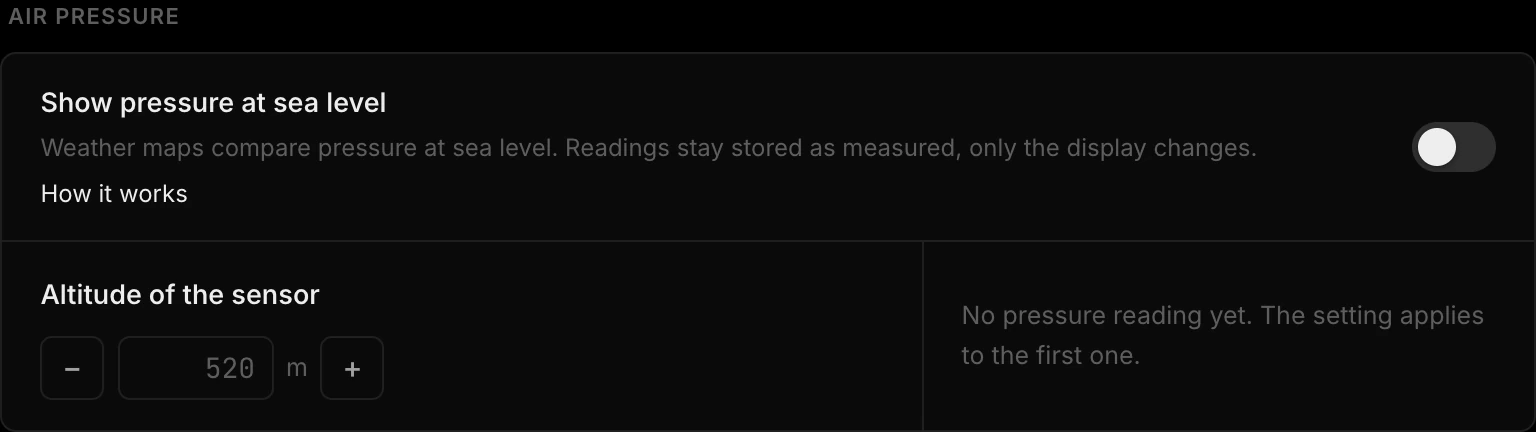
A device sends the pressure it measures where it stands. Higher up the reading is lower: at 500 m a sensor shows about 60 hPa less than the weather report.
To compare with weather maps, open the sensor page, press Settings and go to Pressure and battery. Switch on Show pressure at sea level, enter the Altitude of the sensor in meters and press Save changes. If the sensor is a station with a height, Set station height fills it in for you. The card shows your last reading as Measured next to what HydroNode will show, for example 961.8 hPa as 1022.6 hPa at 520 m.
The reduction follows the standard atmosphere and uses the newest temperature of the same sensor, or 15 °C without one. The altitude of a station only says where it stands and does not change any pressure.